

- How long should you stand at a standing desk? A simple schedule - November 3, 2026
- Best Standing Desks for Small Spaces: 2026 Buyer’s Guide - November 2, 2026
- Best Monitor Arm (2026): Top Picks by Budget and Desk - October 30, 2026
Best ergonomic keyboards of 2026: picks by layout, budget and use
A ZSA rep once told Engadget’s reviewer that moving to the Voyager feels like forgetting how to type overnight. That’s the entry fee for the most extreme layouts, and most people don’t need to pay it.
For most typists, the best ergonomic keyboards are the Logitech Ergo K860 for easy wireless comfort, the Kinesis mWave for a mechanical feel, and the ZSA Voyager if you’ll relearn typing on a fully split, thumb-cluster board. On a budget, the Kensington Pro Fit Ergo KB680 and Logitech Wave Keys cost far less. Choose by how much relearning you’ll tolerate first, then by price.
Key takeaways
- Alice and curved boards (K860, mWave, Wave Keys) usually feel normal within days, while fully split boards with thumb clusters take weeks.
- In one 90-worker study, properly set-up split keyboards cut wrist ulnar deviation from about 12 degrees to within 5.
- A Cochrane review found no strong evidence either way for using ergonomic keyboards to treat carpal tunnel, so buy for posture, not treatment.
- Prices run from about $50 (Perixx Periboard-512) to $365 (ZSA Voyager) and $369 before add-ons (Dygma Defy).
- Kinesis announced the Advantage2 wind-down in January 2026, with stock expected through 2026 and possibly early 2027.
- Mouse reach and desk height can cancel the gains, since Cornell warns split boards on a too-high surface can raise shoulder strain.
Best ergonomic keyboards in 2026: the short list
Testers don’t agree on one winner, and that’s useful. RTINGS calls the MoErgo Glove80 the best ergonomic keyboard it has tested for enthusiasts who want a highly adjustable board. Engadget leads with the Logitech Ergo K860 for wireless use and says the ZSA Voyager became its reviewer’s daily driver. PopSci picks the Logitech Wave Keys because there’s nothing to relearn. Each pick fits a different reader, so this table sorts them by how much relearning they ask for.
| Keyboard | Layout | Typical price (USD) | Adjustment time | Best for |
| Logitech Wave Keys | Curved, standard layout | About $70 | Days | Beginners |
| Kensington Pro Fit Ergo KB680 | Alice split | Under $100 | Days | Budget posture change |
| Logitech Ergo K860 | Alice split | $150 list | Days | Most people |
| Kinesis mWave | Alice split, mechanical | About $120 | Days | Mechanical fans |
| Keychron Q11 | Fully split, staggered | About $205 | 1 to 3 weeks | Split without new layout |
| ZSA Voyager | Split, columnar | $365 | 2 to 4+ weeks | Programmers |
| Dygma Defy | Split, columnar | $369 base | 2 to 4+ weeks | Heavy customizers |
| MoErgo Glove80 | Contoured split | About $400 | Weeks | Enthusiasts |
| Kinesis Freestyle Edge RGB Plus | Fully split, staggered | Check retailer | 1 to 3 weeks | Gamers who work |
Prices come from Engadget, retail listings and secondary reviews checked in October 2026, so confirm at checkout. Adjustment times are typical ranges from reviewer reports, not lab measurements. The best ergonomic keyboards help only if you keep using them, and a steep learning curve is the usual reason people drift back to a flat board. Later sections put numbers on that dip.
Pick your layout first: Alice, split, or columnar
Choose the layout before the brand, because layout decides how long you’ll struggle. Engadget sorts most ergonomic keyboards into two camps, and a third has grown out of the enthusiast scene.
- Wave or curved boards (Logitech Wave Keys) keep the standard layout and lift the middle of the key rows. Engadget’s reviewer says the ergonomics are minimal.
- Alice or unibody split (K860, mWave, KB680) rotates the two halves about 30 degrees apart at the bottom. Your elbows move off your ribs, and the keys stay where your fingers expect them.
- Fully split (Keychron Q11, Freestyle Edge) gives you two halves to place shoulder-width apart, with the mouse between them if you like.
- Columnar with thumb clusters (Voyager, Defy, Glove80) stacks keys in straight columns and hands Enter, Space and modifiers to your thumbs. It has the highest ceiling and the steepest learning curve.
Two features cut across all four. Tenting lifts the inner edges toward a handshake position. Negative tilt slopes the board away from you so your hands don’t bend back. Engadget’s reviewer found negative tilt more comfortable while standing and preferred a flat board when seated, so adjustability matters more than the spec sheet.
If you learned on a staggered keyboard, columnar boards cost you days or weeks before the C, N, M and B keys feel natural. Weigh that cost honestly, because layout is the one spec you can’t change after purchase, while tenting kits and wrist rests can sometimes be added or removed. Among the best ergonomic keyboards at every price, layout decides the experience.best split keyboards.
Best ergonomic keyboard for most people: Logitech Ergo K860
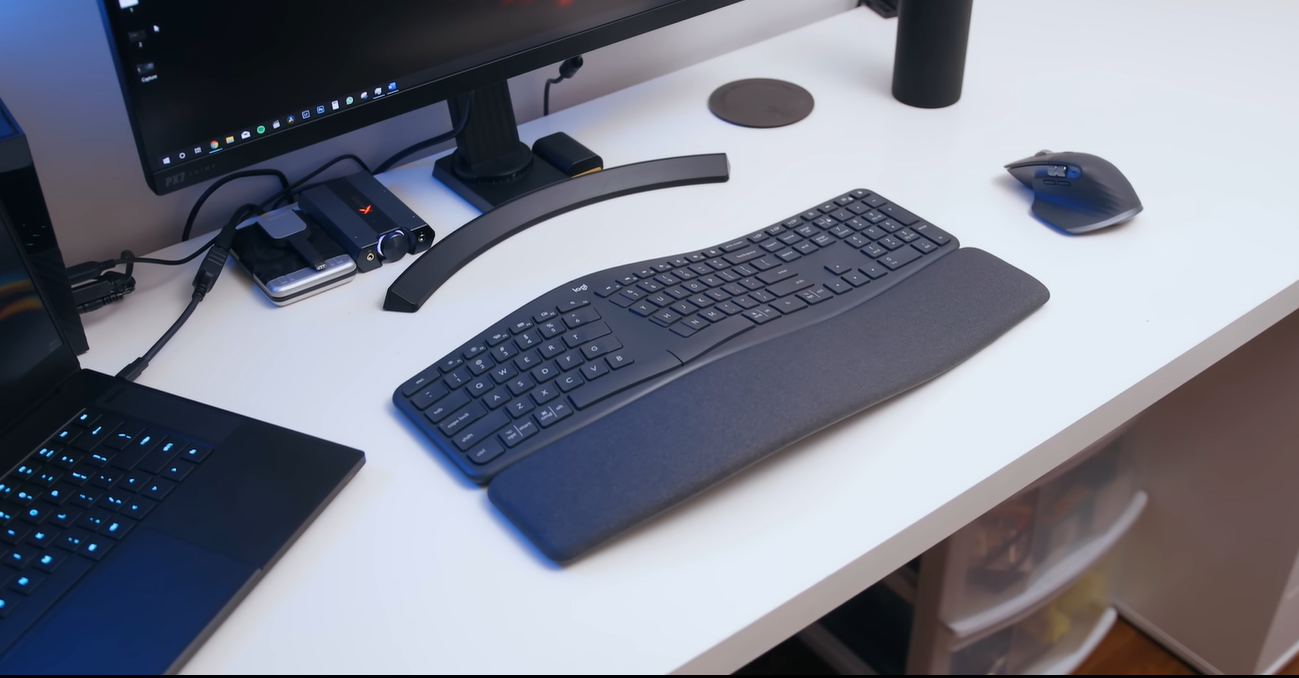
The Logitech Ergo K860 tops Engadget’s guide because it looks and works like the full-size keyboard you already use. It adds an Alice split, a tented center, optional negative tilt and a cushioned wrist rest. Engadget’s reviewer reported straight wrists, elbows clear of the ribs and palms rotating naturally inward. Logitech claims the curve keeps wrists up to 25 percent straighter than a flat board. Treat that as a vendor number, and lean on the research section below for real evidence.
The specs that matter: Bluetooth or a USB receiver, three-device switching that worked between a MacBook and a PC, scissor-switch keys, a numeric keypad and Logi Options+ software. List price is $150, and retail listings ranged from about $118 to $128.
Two drawbacks are real. The palm rest doesn’t come off, and the numpad stretches the right side, which pushes your mouse farther out. People coming from mechanical boards also call the scissor keys mushy. One forum user who swapped a Microsoft Sculpt for a K860 said it feels similar but needs slightly less force per key.
It’s also the easiest to bring into a shared office, since it pairs over Bluetooth or a standard USB receiver and nobody has to learn a custom layout. Among the best ergonomic keyboards, that low-friction setup is its main selling point, and its main limit is that it stops at gentle ergonomics.
Skip it if you want programmable layers or a small footprint. Everyone else can start here.
Best ergonomic keyboards under $100
Three boards cover this price band, and they aren’t equal.
The Kensington Pro Fit Ergo KB680 is the one that changes your posture. It has an Alice split, center tenting, optional negative tilt and a wrist rest, with two Bluetooth connections or a USB receiver. Engadget’s reviewer found the membrane keys springy and the low-profile keycaps quick, and Kensington rates the USB-C battery at about four months per charge. The catches: Windows-coded keycaps, a Copilot key, and remapping software that gave Mac users trouble. The tenkeyless KB675 is a similar option if you want the mouse closer.
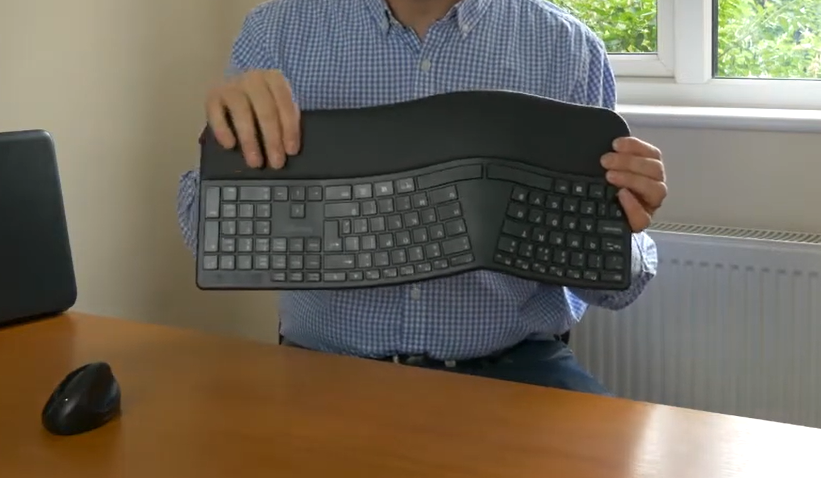
The Perixx Periboard-512 sits near $50 wired, with a split layout in a bulky body.
Under $100 you won’t find columnar boards or deep programmability, and that’s fine for most readers. The best ergonomic keyboards at this price change your wrist angle and little else, which is enough to learn whether the idea suits you before you spend $365.
The call: pick the KB680 if you want a posture change, and the Wave Keys if you want comfort with zero adjustment period.
Best mechanical ergonomic keyboards: Kinesis mWave and Keychron Q11
Mechanical typists have two good routes, and they sit at opposite ends of the learning curve.
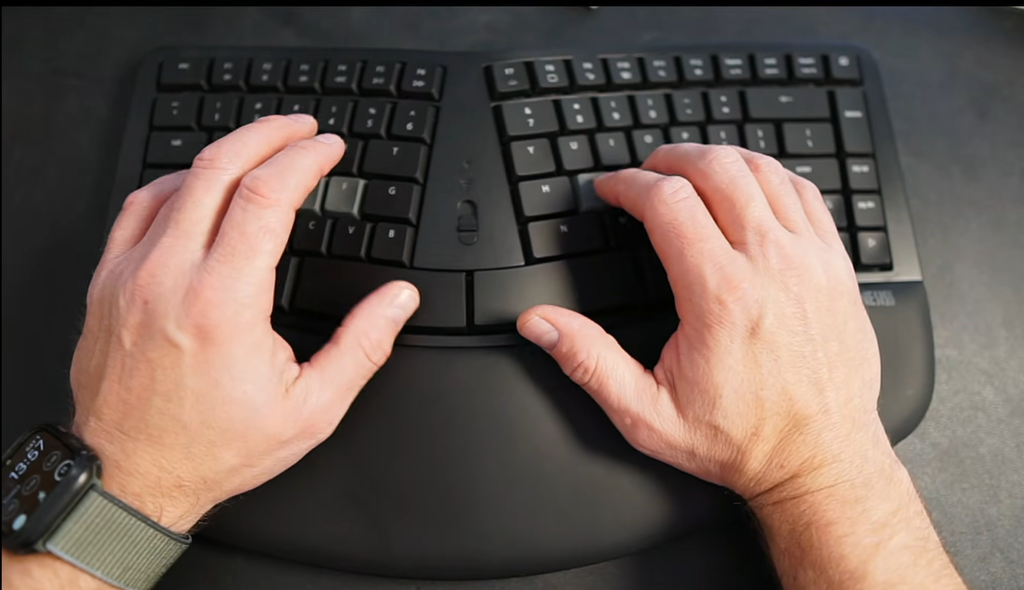
The Kinesis mWave is the gentle one. It keeps the K860’s ergonomics (Alice split, tented center, magnetic feet for optional negative tilt) and swaps in low-profile Gateron Brown switches, a tenkeyless body and programmable layers. Engadget puts it about $30 under the K860, and one retailer lists it near $119. A Kinesis rep told Engadget the board was designed to replace the Microsoft Sculpt. The newer version offers quiet Gateron Reds and a USB-C to C cable for $10 more. Drawbacks: the wrist rest is fixed, and the browser-based Clique software has few spare keys, so you’ll lean on layers for a number pad.
The Keychron Q11 is the bolder one. Engadget’s reviewer describes it as a 75 percent mechanical board sawed in half, with an aluminum body, PBT keycaps, Gateron G Pro Red switches, two knobs and five macro keys, all programmable through QMK and VIA. It lists around $205. The split keeps your shoulders open, but there’s no center tenting and the cable linking the halves is short. A wireless Q11 Ultra reportedly costs about $240, so confirm that on Keychron’s site before you plan around it.
Both rank among the best ergonomic keyboards for people who care about switch feel, and both let you remap keys without a proprietary dongle.
Pick the mWave for Alice comfort with mechanical feel. Pick the Q11 for a split that keeps the staggered layout you already know.
Best split ergonomic keyboards for programmers: ZSA Voyager and Dygma Defy
Programmers pay for layers, and these two boards sell them.
The ZSA Voyager costs $365. It’s a wired, fully split board with 52 low-profile keys, Kailh Choc switch compatibility, magnetic feet for tenting and a thumb cluster that carries Return, Space and more. Engadget’s reviewer found it so awkward at first that they swapped in another keyboard mid-test, yet it became a daily driver. Setup runs through the browser-based Oryx tool or the Keymapp app, and Notebookcheck calls it as beginner-friendly as a programmable board gets. Expect a few weeks of practice and about a week of tweaking your layout.
The Dygma Defy starts at $369 and adds full-size keycaps, detachable wrist rests and 16 thumb-cluster keys. Engadget ranks its Bazecor software among the easiest to figure out. Price creep is the catch: underglow adds $70, extreme tenting $80 and wireless $90, which took the reviewer’s unit to $609. ZSA’s Moonlander is the full-size sibling if you want more keys than the Voyager.
These are the best ergonomic keyboards for people who already live in layers, shortcuts and macros, because every key can be remapped. If you won’t touch the layout, the roughly $215 premium over a K860 buys mostly a steeper learning curve.
Engadget’s verdict is that the Voyager suits a minimalist desk and the Defy suits a maximalist one. Both have a high learning curve, so budget a light work week for the switch.
Best contoured keyboards for heavy typists: Glove80 and Advantage360
Contoured boards curve the key wells so your fingers don’t stretch flat. RTINGS rates the MoErgo Glove80 the best ergonomic keyboard it has tested for people who want maximum adjustability. It’s wireless and sells for roughly $400 according to secondary listings, so confirm on MoErgo’s site.
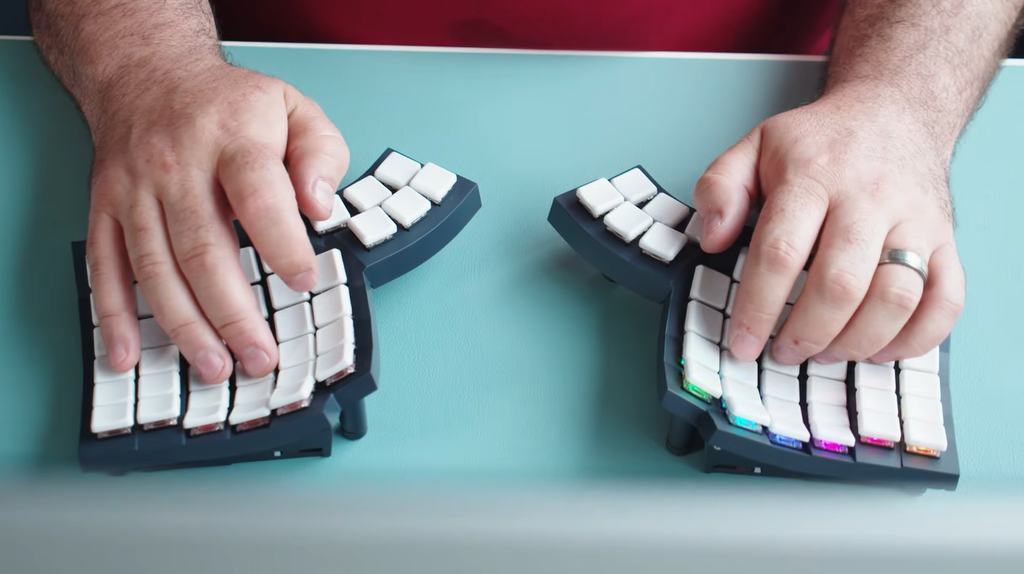
The Glove80’s weak spots are feel and fuss. One reviewer found it light to the point of flimsy, and the switches sound loud on the thin frame. Tenting uses stilts with no markings, so matching both halves is guesswork. The weight does buy portability: half a Glove80 weighs 235g, against 758g for half an Advantage360 and 360g for half a Moonlander.
The Kinesis Advantage360 Professional, roughly $500, is the heavier, older-school answer. Engadget describes it as fully split, wireless and columnar, with thumb clusters, concave key wells and tenting from low to intense. A forum owner who moved from an Advantage to a Glove80 said the pinky columns felt easier to reach and the thumb cluster felt better. The same owner criticized the Advantage360’s switches and Bluetooth reliability. That’s one owner’s view, but it’s a useful warning to test before you commit.
If you want the best ergonomic keyboard for a decade of typing and you’ve survived a split-board switch before, this tier is where the ceiling sits. First-timers should treat these as a second purchase, since a $400 to $500 board is an expensive way to learn you dislike columns.
Who this suits: people with years of typing ahead and the patience to relearn. Most office workers can stop at an Alice board.
Best ergonomic keyboard for gaming and desk work: Kinesis Freestyle Edge RGB Plus
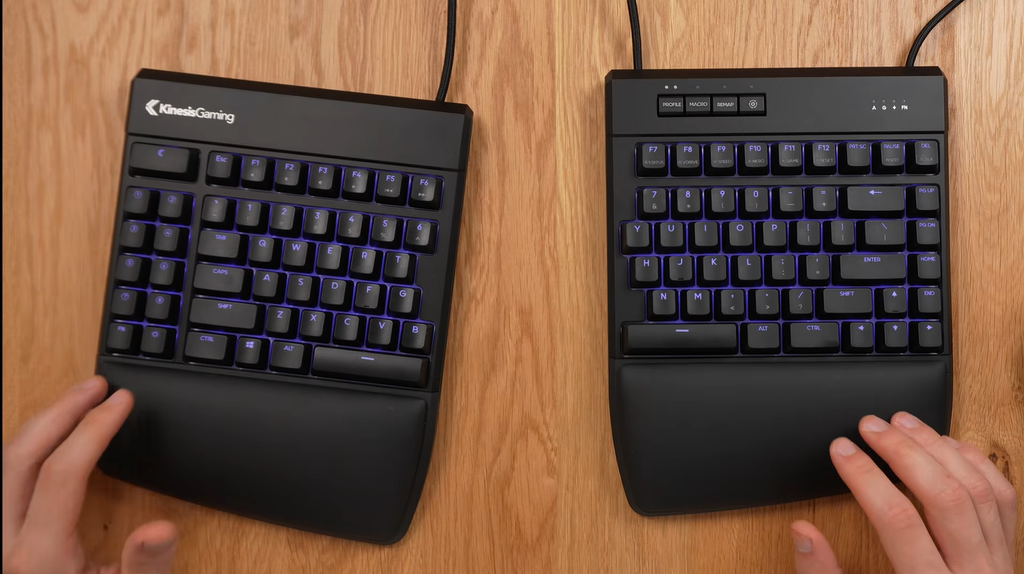
Gamers who also work all day get one sensible option: the Kinesis Freestyle Edge RGB Plus. Released in October 2025, it’s fully split with a staggered layout, so it takes less relearning than a columnar board. The included tent kit raises the center by 0, 10 or 15 degrees, and the wrist rests come off, though the lift kit needs them installed. The keys are Gateron Pro switches, with eight programmable keys on the left and nine profiles for different games and work layouts.
The split pays off in play. Engadget notes WASD players can park the right half elsewhere and keep the mouse front and center.
Faults exist. Engadget’s reviewer found the SmartSet app finicky and used the on-board Macro and Remap keys instead. The cable is still USB-A with a USB-C adapter in the box, and the body is bulky.
For the best ergonomic keyboard that also handles shooters and spreadsheets, the Freestyle Edge’s staggered split is a safer bet than a columnar board, because the key positions you already know still apply. Keep your old board for competitive matches until your accuracy catches up.
Wired versus wireless deserves a thought. Engadget points out that wired boards never run out of battery and have fewer connection problems, and competitive players may want zero lag. For gaming, the wired design isn’t a flaw.
Retail prices vary, so check Kinesis and Amazon before you buy.
Replacing a Microsoft Sculpt or Kinesis Advantage2
Two beloved boards are leaving, and each has a clear replacement path.
Microsoft stopped making most of its ergonomic keyboards, including the Sculpt. Incase announced a deal to license Microsoft’s designs and rebuild the Sculpt, but a January 2024 report called the re-release pending, so confirm whether it shipped before you wait. Meanwhile, the Kinesis mWave is the closest successor: a Kinesis rep told Engadget it was built as the Sculpt’s replacement, with mechanical keys, no dongle and programmability. Forum owners point to the Logitech K860 as another Sculpt stand-in, and Perixx sells cheaper membrane boards in a similar shape.
Skip Microsoft’s Surface ergonomic keyboard if mouse reach matters. A user on Microsoft’s forum noted its built-in numpad pushes the mouse far to the right, which they linked to shoulder pain.
The Advantage2 is next. Kinesis announced in January 2026 that it’s winding down production and selling units while supplies last. The company expects availability through 2026 and possibly into early 2027, depending on demand. If you love the original contoured design, buy one soon and plan your next board now.
Shop these as the best ergonomic keyboards for former Sculpt and Advantage users, not as drop-in clones, since key force, layout and wrist rest shape all differ.
For the next board, the Advantage360 Professional keeps the family look in a fully split, wireless build. The Glove80 trades heft for portability and, per one former Advantage owner, a better thumb cluster. Both cost more than most Alice boards.
What the research says about ergonomic keyboards and carpal tunnel
The posture evidence is the strong part. In a study of 90 experienced office workers, correctly set-up split keyboards cut mean ulnar deviation, the outward bend of the wrist, from about 12 degrees to within 5 degrees of neutral. Marklin et al. 1999, Human Factors Cornell’s ergonomics summary puts the typical reduction for split designs at 5 to 10 degrees, adds that they don’t reduce wrist extension, and warns that on a too-high surface they can increase shoulder abduction. Opening angle matters too. A wide gap can swing the wrist into radial deviation, and a carpal tunnel pressure study advises avoiding extension above 30 degrees and radial deviation above 15 degrees in long sessions.
Results aren’t unanimous. One Cornell lab study of trained typists on a fixed-angle split board found no objective posture benefit during short-term use.
Pain is the weak part. A Cochrane review of ergonomic keyboards for treating carpal tunnel syndrome found two trials with 105 people. A 25-person trial showed less pain at 12 weeks but not at six, and an 80-person trial showed no difference at six months. The authors concluded the evidence is insufficient either way. Cochrane review CD009600 A separate prevention review of 24 studies found alternative keyboard supports may help, yet none proved prevention.
So buy one of the best ergonomic keyboards for posture and comfort, and don’t count on it to treat nerve symptoms. Numbness or tingling in your thumb, index and middle fingers calls for a clinician, not a new keyboard.
How long it takes to adapt to an ergonomic keyboard
Adjustment depends on the layout, and the reports line up better than you’d expect.
| Source | Board type | Reported adjustment |
| Engadget reviewer | Fully split with thumb clusters | About a month to feel fully comfortable |
| splitkb customer survey | Split keyboards | 2 to 4 weeks to workable speed, 2 to 4 months to original speed |
| Developer blog | ZSA Voyager | About a week to 80 percent, two weeks to 100 percent |
| Blogger with keybr graphs | Split keyboard | Started near 25 wpm, back to normal in about 6 weeks |
| Forum poster | Ortholinear split | Under 20 wpm at first, about a month to match old speed |
These are anecdotes, so read them as ranges. Treat the best ergonomic keyboards like a new instrument: short daily practice beats one long, frustrating session. Alice boards like the K860 and mWave stay close to a normal layout, and Engadget says they feel similar to a regular keyboard.
To shorten the dip:
- Start in a light work week, not before a deadline.
- Keep your old keyboard plugged in for the first days.
- Practice in short daily sessions with a typing trainer such as keybr.
- On programmable boards, use the built-in aids. Keymapp shows your inputs live.
- Change the layout a little at a time. Engadget’s reviewer spent about a week getting every key right.
splitkb says speed isn’t the point of a split keyboard and that customers often end up with better touch-typing form. The blogger above finished the climb at a normal speed with no pain.
Set up your desk so the keyboard works
A good keyboard on a bad setup loses most of its value. Four adjustments matter more than switch type.
Even the best ergonomic keyboards can’t fix a monitor that’s too low or a chair that’s too high, so raise the screen to eye level and keep the keyboard close enough that your upper arms hang naturally.
Mouse reach comes first. Numeric keypads lengthen the right side, and Engadget’s reviewer noted the K860’s pad forces the mouse farther out. A tenkeyless board like the mWave keeps it closer, and layers can still give you number input. With a fully split board, you can place the mouse between the halves, and Engadget’s reviewer found a vertical mouse helped even more. best ergonomic mouse
Next, desk height. Cornell’s summary warns that split boards on a too-high surface can raise your shoulders. If your elbows aren’t near 90 degrees, fix the chair or desk before you spend $365.
Third, the wrist rest. Fans say a rest keeps the hand neutral, and critics say it presses on tendons and can aggravate carpal tunnel. Engadget suggests resting palms, not wrists. Boards with removable rests, like the Freestyle Edge and Defy, let you test both.
Last, tilt and movement. Engadget’s reviewer used negative tilt while standing and kept the board flat while sitting. The same guide recommends standing and walking about hourly, because no keyboard fixes sitting still all day. standing desk setup guide
Quick check: shoulders loose, elbows slightly open, wrists straight, and the mouse within easy reach of the keyboard edge.
Summary: how to choose the best ergonomic keyboards for your desk
Work through these steps in order and you’ll rarely pick wrong.
- Set your relearning budget. Days for Alice or wave boards, weeks for fully split, a month or more for columnar with thumb clusters.
- Match the board to your price. Under $100, the Kensington KB680 changes posture and the Wave Keys (about $70) adds comfort with no learning. Around $120 to $150, the Kinesis mWave and Logitech Ergo K860 are the best ergonomic keyboards for most people. Near $205, the Keychron Q11 gives a split with a familiar layout. From $365, the ZSA Voyager and Dygma Defy suit programmers, and the Glove80 and Advantage360 suit long-term heavy typists.
- Read the add-on costs. Defy extras can push it to $609, numpads push the mouse out, and some wrist rests don’t detach.
- Weigh claims by evidence. Posture gains from split boards are documented, with ulnar deviation falling from about 12 degrees to within 5. Pain and carpal tunnel benefits are unproven, so see a clinician for symptoms.
- Plan the switch. Expect days for Alice, 2 to 4 weeks to reach workable split speed, and up to a few months to return to old speed.
- Fix the desk. Mouse reach, chair height and tilt decide whether the board helps.
If you buy one board today, make it the K860 or the mWave. If you want the highest ergonomic ceiling and can afford a bad month of typing, make it the Voyager.
FAQ
Are ergonomic keyboards worth it?
For heavy typists, yes, for posture. One study found split designs cut ulnar deviation from about 12 degrees to within 5. Pain relief isn’t proven, so don’t buy one as a treatment. Light typists can start with a $70 Wave Keys and relearn nothing.
What is the best ergonomic keyboard for carpal tunnel?
No keyboard has proven treatment value, and the Cochrane review found the evidence insufficient either way. If a clinician suggests one, an Alice or tented split board like the K860, mWave or Voyager reduces wrist bend. Raise nerve symptoms with a doctor first.
How long does it take to get used to an ergonomic keyboard?
Alice boards like the K860 usually feel normal within days. Fully split boards need 2 to 4 weeks to reach workable speed, and thumb-cluster layouts can take a month or more. Full original speed can take 2 to 4 months.
Is an Alice layout or a split keyboard better?
Alice is easier: one body, keys rotated about 30 degrees apart, almost nothing to relearn. Fully split boards let you set shoulder width and park the mouse between the halves. Choose Alice for office work, split if you’ll accept an adjustment period.
Are wrist rests good or bad on an ergonomic keyboard?
It depends. Supporters say a rest keeps the hand neutral, while critics say it presses on tendons. Rest your palms, not your wrists, and pick a board with a removable rest.
What is the best ergonomic keyboard for Mac?
The K860 works on Mac and Windows, with hotkeys working on both. The mWave has a Mac model, and the Keychron Q11 has a Mac and Windows switch. The Kensington KB680 is Windows-coded, and its software gave Mac users trouble.