

- How long should you stand at a standing desk? A simple schedule - November 3, 2026
- Best Standing Desks for Small Spaces: 2026 Buyer’s Guide - November 2, 2026
- Best Monitor Arm (2026): Top Picks by Budget and Desk - October 30, 2026
Tom’s Guide and Business Insider both name the BenQ e-Reading their best desk lamp overall, and Tom’s lists it at $199. At the other end, Tom’s calls a $9 IKEA Flottilj one of the brightest lamps it tested. Your desk decides which one you need.
The best desk lamps for home office work put 300 to 500 lux on your work surface, cover a color temperature range of roughly 2700K to 5700K, and show no flicker on camera. The BenQ e-Reading is the best all-rounder, the UPLIFT E7 is the best clamp lamp for a standing desk, and the IKEA Flottilj is the best cheap option. Choose by desk depth and monitor count first, then by price.
This guide covers seven picks, the specs that separate a good lamp from a bad one, and a flicker check you can run at home with a phone.
Key Takeaways
- Target 300 to 500 lux on the desk. A European office standard cited in manufacturer documents sets 500 lux for computer work and 750 for technical drawing.
- The BenQ e-Reading runs from 2700K to 5700K and dims itself with an ambient light sensor, according to Tom’s Guide.
- A clamp lamp frees desk space but needs an edge thick enough to grip. Wirecutter’s pick for that job is the UPLIFT E7.
- The IKEA Flottilj costs about $9, or roughly $15 once you add the E17 bulb it doesn’t include.
- A monitor light bar such as the BenQ ScreenBar Halo 2 avoids screen reflections but lights less of your desk than a lamp does.
- Film the lamp in slow motion at its lowest brightness. Moving bands mean flicker, and few listings publish flicker numbers.
Best desk lamps for home office: quick picks by setup
Your desk shapes this decision more than any spec sheet does. A shallow desk wants a clamp or a light bar, a two-monitor desk wants reach, and a day of video calls wants good color rendering. Here’s where each pick lands.
| Setup | Pick | Why it wins | Price note |
| Best overall | BenQ e-Reading | Wide color range, auto-dimming, 30-inch reach | $199 (Tom’s Guide) |
| Clamp and standing desks | UPLIFT E7 | Light, stable, glare-free, one-button control | Check current price |
| Cheapest good lamp | IKEA Flottilj | One of the brightest Tom’s Guide tested | About $9, $15 with bulb |
| Small desks | Anglepoise 90 Mini Mini | Most adjustable lamp Wirecutter tested | Pricey |
| Dual monitors | Double-head 24W clamp lamp | Wide coverage, fewer hand shadows | Around $58 on listings |
| Screen glare | BenQ ScreenBar Halo 2 | Zero desk footprint, asymmetric optics | Premium |
| Video calls | Vari LED Studio Desk Lamp | Tom’s Guide pick for calls | Check current price |
Two more lamps don’t fit one row cleanly. Business Insider named the IKEA Forså best budget, and Wirecutter ranked it second for adjustability behind the Anglepoise. Business Insider also picked the Honeywell Sunturalux foldable lamp for small spaces. Both appear in the sections below.
Outside the BenQ, the big review sites don’t agree on a winner, which is why the table splits by setup instead of crowning one lamp. The Amazon roundups reward a different group (Lepro, Pzloz, Voncerus, Airlonv), and we cover Lepro and Airlonv below because they appear most.
Prices come from the reviews and retailer listings we cite, and they shift. Confirm at checkout. If you’re rebuilding the whole desk, home office desk setup guide covers monitor height and chair position, which change where a lamp should sit.
How we picked these lamps and what we didn’t test
We didn’t run a lab. We read four published review sets side by side (Wirecutter, Tom’s Guide, Business Insider and CNN Underscored) and kept lamps that at least one of them named for a distinct desk problem. Then we checked each against the specs that decide comfort at a desk: lux, color temperature range, color rendering (CRI), flicker and footprint.
So the hands-on testing behind these picks belongs to the reviewers. Business Insider consulted an ophthalmologist, an ergonomist and an engineer. Wirecutter’s staff voted by price category, and the Wirecutter list we reviewed is the 2025 edition. Where a figure comes from a retailer listing instead of a reviewer, we say so, because listing copy is marketing. Phrases like “eye-caring” and “flicker-free” appear on nearly every Amazon and Newegg listing, and almost none print a flicker percentage or a measurement method.
Three rules shaped the shortlist:
- A pick has to solve a specific desk problem, such as a shallow desk or a second monitor.
- A pick has to let you change brightness and color temperature, since a 2 p.m. spreadsheet and a 9 p.m. email need different light.
- A pick has to appear in a credible review, because Amazon review counts measure sales, not light quality.
We also skipped pages we couldn’t trace to a named reviewer or a stated method. Several sites republish Wirecutter’s text word for word, and a copy adds no testing.
We use affiliate links. If you buy through them, we earn a commission at no extra cost to you. We’d rather you return a lamp that fails the flicker test below than keep one that gives you headaches, so use the checks in the last sections before the return window closes.
Best desk lamp overall: BenQ e-Reading
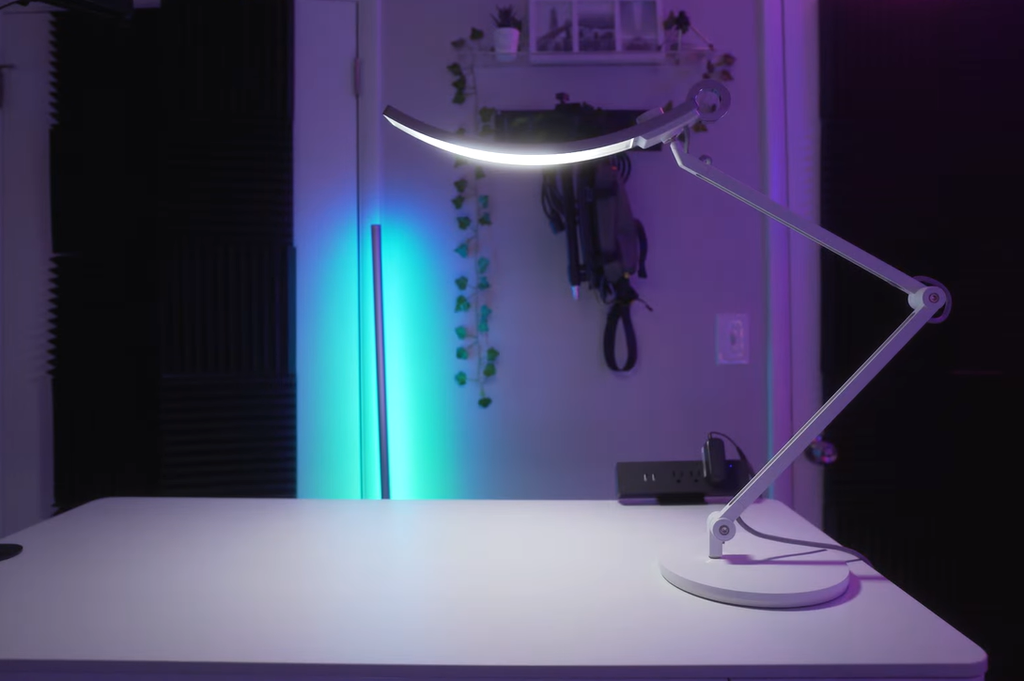
Tom’s Guide calls the BenQ e-Reading its best overall because of how much it lets you customize, and Business Insider chose it as its top lamp too. CNN Underscored leads its own list with the related BenQ WiT.
The numbers explain the praise. Business Insider counted 22 brightness settings and 13 color temperature options, adjusted with one knob and mixable, the most of any lamp it tested. Tom’s Guide puts the temperature range at 2700K to 5700K and says the lamp reads ambient light to adjust itself. The arm extends up to 30 inches vertically, so the head can sit above a full-size monitor.
Day to day, the design stays out of the way. A single knob toggles between dimming and temperature, and a touch-sensitive switch near the arm joint turns the lamp on. Tom’s Guide’s reviewer liked finding that switch in the dark, then admitted he toggled it by accident many times while repositioning the head. The angled head also throws light onto nearby walls, which evens out the room, and UCLA’s ergonomics guidance recommends keeping lighting levels as even as possible.
The tradeoffs are price and footprint. At $199 it costs more than 20 Flottilj lamps, and one reviewer notes it takes up more desk space than minimalist designs. If your desk is shallow, buy the clamp lamp in the next section. For context, a vendor’s April 2026 sample of 77 ChatGPT and Google AI Overview answers also listed the e-Reading among top-rated desk lamps, next to the Koncept Z-Bar and Gantri Task Lamp. That’s a popularity signal, not a test.
Buy it if you work long hours and move between daylight tones and warm evening light. Skip it if you want a lamp that disappears.
Best clamp-on desk lamp for standing desks: UPLIFT E7
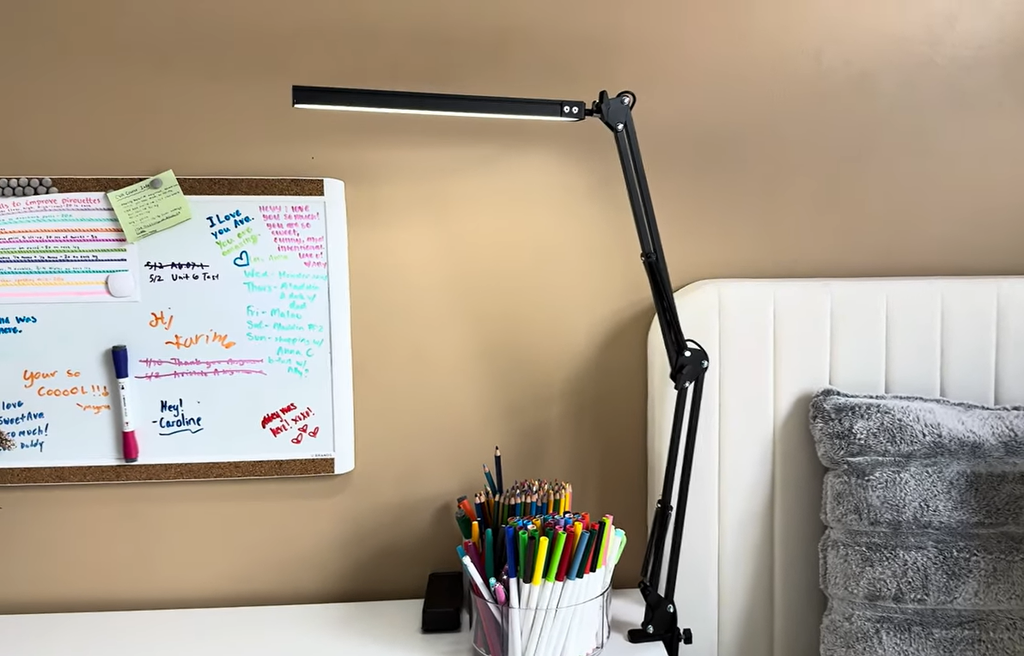
Clamp lamps give back desk space, and on a standing desk that matters twice, because everything on the surface rises and falls with the desk. Wirecutter picked the UPLIFT E7 for that job, and Tom’s Guide named it best clamp-on, photographing it on a standing desk.
Wirecutter’s case is practical. The E7 is lightweight but stable, affordable without feeling cheap, and slender enough to stretch high and wide while casting glare-free, adjustable light. Controls live on one square button on the LED bar: tap or hold for stepless dimming. There’s no app and no smart features, which Wirecutter counts as a virtue. The reach matters on a sit-stand desk, because the head has to clear a monitor at standing height and still reach the keyboard when you sit. It also dropped the TaoTronics from its picks after comparing the two, citing cheap plastic and limited height adjustment.
Before you buy any clamp lamp, check three things:
- Clamp range. Compare the stated thickness range with your desktop. One review warns that clamp models need a desk edge thick enough to hold.
- Edge shape. A rounded, beveled or glass edge may not grip a flat clamp pad.
- Cable slack. Leave enough cord for the full height range of a sit-stand desk, or the cable tugs the arm as the desk rises.
For a higher-end alternative, Wirecutter added the Humanscale Nova to its picks in 2022, and UPLIFT sells Humanscale task lights beside its own. best standing desks.
We aren’t quoting a price here. Confirm it on the product page.
Buy it if your desk moves or runs shallow. Skip it if you want memory presets or app control, since the E7 has neither.
Best budget LED desk lamp: IKEA Flottilj, Forså and Lepro
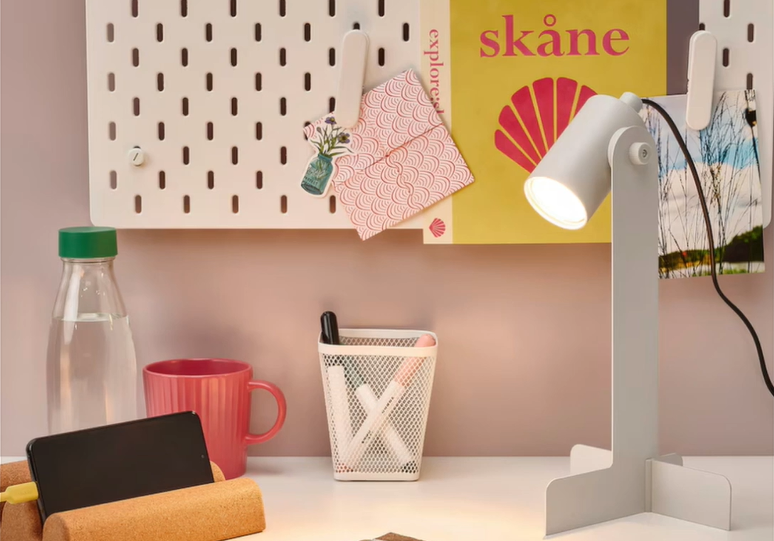
Three lamps cover most budget needs, and each solves a different problem.
The IKEA Flottilj is the cheapest good option. Tom’s Guide says it costs $9, about $15 with the separately sold E17 bulb, yet it’s one of the brightest lamps the site tested. IKEA claims 25,000 hours between bulb swaps. It’s a build-it-yourself model, so plan to assemble it.
The IKEA Forså suits anyone who moves the lamp around. Business Insider named it best budget and found it offered the most range of motion of any lamp it tested, and Wirecutter ranked it second for adjustability behind the Anglepoise 90 Mini Mini. Assembly takes more effort: you attach the arm to the base, set the springs that control movement, and fit the dome that holds the bulb. Business Insider tested a turquoise version that appears to be discontinued, so check which colors remain.
The Lepro metal clamp lamp is the Amazon-roundup favorite. A retailer listing shows 9.5W, 800 lumens, five color modes and five brightness levels, and an April 2026 price snapshot put the clamp version at $18.99. Many affiliate roundups crown it, but they back that with Amazon review counts instead of measurements, so read the ranking as popularity.
Pick the Flottilj for a laptop desk, the Forså for adjustability, and the Lepro when your desk edge can take a clamp.
What you give up at this price is control and proof. Budget lamps tend to have coarse brightness steps, fewer color options and no published flicker data. If you work at the desk eight hours a day, spend more, or run the slow-motion flicker test later in this guide.
Check clamp thickness before ordering any clamp model. Reviewers flag that Airlonv’s clamp lamp needs a desk edge thick enough to hold.
Best desk lamp for small desks: Anglepoise 90 Mini Mini
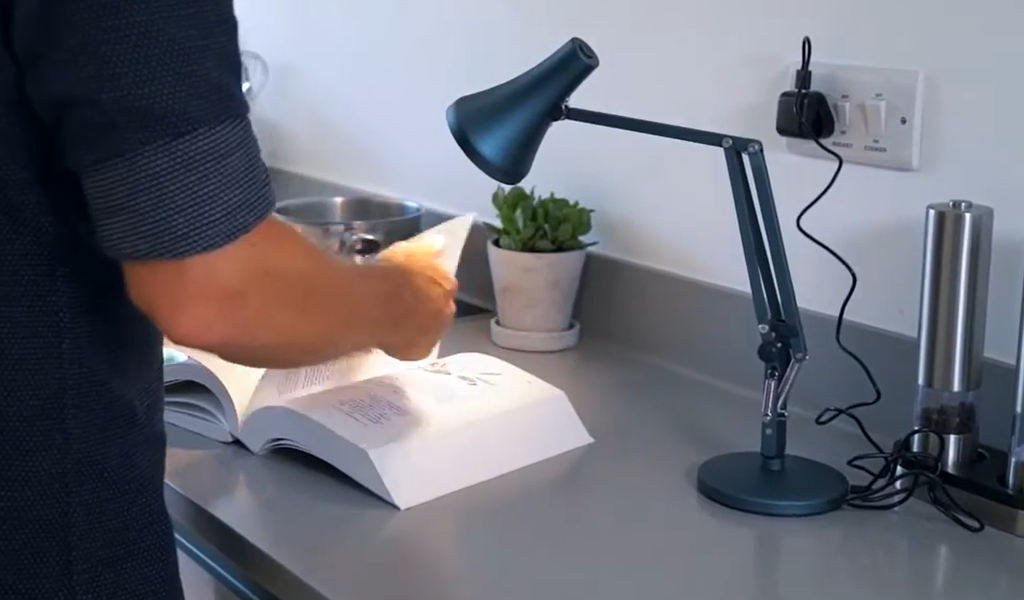
When a laptop, a notebook and a mug already fill the desk, you need a lamp with almost no footprint and plenty of reach. Wirecutter calls the Anglepoise 90 Mini Mini the most adjustable lamp it tested and its top pick for anyone who has to make every bit of surface space count.
The engineering explains it. A three-spring design holds the arms in place, and Wirecutter reports they never sprang forward or tipped back, however far it pushed the head. An included hex tool tightens or loosens the joints. Anglepoise says the lamp ships with a plug-in adapter and a USB cable, an integrated dimmable LED rated for up to 20,000 hours, and a switch on top of the shade. Wirecutter says you can power it from a wall outlet, a USB-A port or an external battery pack. It has no internal battery and doesn’t work with smart sockets. It comes in six colors. That USB option helps on a cramped desk, since one less wall adapter means one less cable.
The catch is the shade. At 3.5 inches wide it throws a smaller pool of light than Wirecutter’s other picks, so it works as a task light for paper and a keyboard, not as a lamp for a wide desk. Wirecutter also calls it pricey.
Business Insider offers a cheaper route in the Honeywell Sunturalux foldable lamp, its best for small spaces. Foldable lamps tuck away between sessions, which helps in a bedroom or shared-room office.
Choose a small lamp if your paper work happens in one spot. If the real problem is a monitor stand crowding the desk, a light bar solves it better, as the lamp-versus-bar section explains.
Best desk lamp for dual monitors and video calls
Dual monitors
Two monitors widen the area you have to light. A short-armed lamp leaves one side in shadow or throws glare onto a screen. The usual fix is a long, double-head clamp lamp. Listings for 24W double-head models with remote controls and anti-glare covers run around $58 at Newegg, and a 37.4-inch extra-wide model with auto-dimming is listed at $113.85.
Those listings promise “no flickering,” but none shows a measurement, so run the flicker test before you trust one. Position the head so the beam lands on the desk between you and the screens, and keep the arm from crossing either monitor. Reach also cuts hand shadows: a lamp on one side casts your writing hand over the page, so a wide head or a second head helps.
Video calls
Tom’s Guide picked the Vari LED Studio Desk Lamp as its best for brightening a video call. Edge-lit panel lamps are the other route. One listing for a LitONES model claims CRI 97.8 and 3000K to 6500K at about $101, though those are the seller’s numbers.
Video-lighting guides, mostly written by sellers, set the CRI floor between 90 and 95, so treat that as a rule of thumb, not a standard. One lighting maker advises 5000K to 5600K to match typical office daylight and warns that warm room light mixed with a mismatched desk light gives skin a color cast that video compression exaggerates.
If calls fill most of your day, buy a dual-use lamp. If they don’t, a standard task lamp with high CRI and an adjustable temperature will do. A dedicated webcam light can wait.
Vari LED Studio Desk Lamp (Check Amazon latest price)
Desk lamp or monitor light bar?
A monitor light bar clips onto the top of your screen and sends light down onto the desk. Its asymmetric optics keep the beam off the glass, so you get no screen reflection and no desk footprint. The BenQ ScreenBar Halo 2 is the premium version that roundups name. The limit is reach: it lights the zone in front of the monitor and little beyond it.
A lamp spreads light wider and moves where you need it. A Lazada decor guide says lamps suit deep desks over 70 cm, multi-monitor setups, and anyone who has to reposition light to kill hand shadows. Put a lamp too close to a monitor, though, and light spills onto the screen, which is exactly the problem bars exist to solve.
One warning on sources. Most lamp-versus-bar pages are brand-owned. BenQ and Yeelight both publish one, and both end by recommending their own bars. Yeelight advises a bar for monitors above 24 inches, which is a seller’s rule of thumb, not independent testing.
Use this rule:
- Single monitor, shallow desk, mostly screen work: bar.
- Paper work, with notebooks off to one side: lamp.
- Two monitors or a deep desk: lamp.
- Curved screen: confirm the bar fits a curve. Listings for 34-inch-plus curved displays sell dedicated models.
A bar also has to fit your monitor’s top edge, so read the mounting notes before you buy. Thin bezels, curved screens and laptop stands each change the answer. Price differs too: Walmart lists generic USB light bars at $19.99 and $39.99, while the Halo 2 sits in the premium tier.
Some desks need both: a bar for the keyboard zone and a small lamp for the notebook beside it. monitor arm guide.
How much light a home office desk needs
Lumens and lux get swapped constantly, and the swap leads to bad purchases. Lumens measure how much light a lamp produces. Lux measures how much of it lands on your desk, and it drops fast as the lamp rises or the beam widens.
| Task | Target on the desk |
| Computer work | 300 to 500 lux |
| Reading and writing on paper | 500 lux |
| Technical drawing | 750 lux |
The 500 and 750 figures come from the European office standard EN 12464-1, as cited in manufacturer documentation. The 300 to 500 range is what consumer guides publish for screen work. A home office doesn’t have to meet an office standard, so read these as targets.
Lamp output sits in a narrower band. One buying guide says a desk lamp needs 400 to 800 lumens, and the Lepro listing above claims 800. Dimming range matters more than the top number. A lamp that runs from soft to full brightness fits both a late email and a morning spreadsheet.
Room light has a say, too. The American Optometric Association’s computer-vision advice, as repeated in trade publications, recommends cutting overhead lighting to about half the normal office level and using a desk lamp for task light. UCLA’s ergonomics team says to keep light levels as even as possible. At the extremes those two pull apart: a dark room with a blazing desk is as bad as a bright room with no task light. Aim for a lit desk in a room that’s somewhat dimmer.
To check your own setup, lay a phone with a lux app flat where your paper or keyboard sits. Phone sensors are rough, so use the number to compare lamp positions, not as a certified reading.
Color temperature and CRI: the numbers to pick
Color temperature
Color temperature, in kelvin, sets how warm or cool white light looks. Incandescent and halogen bulbs sit at 2700K to 3000K, according to BestReviews, while LED desk lamps usually run 4000K to 6000K. Published advice for desk work doesn’t line up. One guide says 3500K to 4500K, BenQ’s knowledge center says 4000K to 6500K, and another guide says about 4000K. BestReviews adds that full-spectrum fluorescent lamps run cooler still, at 6000K to 7500K.
A usable rule sits in the middle. Run around 4000K for daytime screen work and drift toward 3000K after dark. Wirecutter’s older testing cited eye doctors who recommend cooler light for daytime tasks and warmer light at night. Pick a lamp that covers at least 2700K to 5000K, as the BenQ e-Reading’s 2700K to 5700K does, and skip a fixed 6500K lamp unless you know you want it. A Tom’s Guide writer, for one, keeps a daylight-toned lamp at his desk and warm light everywhere else.
CRI
CRI (color rendering index) rates how faithfully a lamp shows colors, on a scale that tops out at 100. Consumer guides treat 80 as the floor for general use and 90 or higher as the target for design, print and any task where color matters. Video-call guides push to 95 for skin tones. Few listings say how CRI was measured, so a printed 97.8 is a claim, not a result. Higher CRI usually costs more, so spend on it where color decisions happen: design proofs, print checks and video calls.
| Situation | Color temperature | CRI |
| Daytime screen work | About 4000K | 80+ |
| Evening reading | 2700K to 3000K | 80+ |
| Video calls | 5000K to 5600K | 95+ |
Flicker, glare, and where to put the lamp
Two problems cause most lamp-related headaches, and spec sheets rarely cover either.
Flicker comes mainly from pulse width modulation (PWM), where a dimmable LED switches on and off fast to look dimmer. IEEE 1789-2015 is the recommended practice on it, and it ties acceptable flicker to frequency, with looser limits as the rate climbs. One summary puts the no-restriction point at 1250 Hz. A study summarized by the DIAL lighting lab found higher headache risk at 100 Hz with modulation above 35 percent. Manufacturers rarely publish these figures, so “flicker-free” on a listing tells you little. One lighting maker advises checking across the full dimming range, since problems can appear at some levels only.IEEE 1789-2015 recommended practice
Test it yourself. Set the lamp to its lowest brightness, film it with your phone in slow motion, and watch for moving dark bands. Bands mean flicker. Clean footage doesn’t prove the lamp is flicker-free, since phone cameras have limits, but banding is a good reason to return it.
Glare is the other cause. A 3M optics engineer quoted by EHS Today calls glare a chief culprit in computer vision syndrome and says it pushes people into awkward postures to see around it. AOA computer vision syndrome guidance.
Place the lamp this way:
- Put it on the side opposite your writing hand, so your hand doesn’t shadow the page.
- Keep the lamp head below eye level and never aim it at your face.
- Aim the beam at the desk, not the screen.
- Turn the monitor off and look for the lamp’s reflection in the black glass. If you see it, move the lamp.
- Keep the screen 16 to 30 inches from your eyes, with the top slightly below eye level, per AOA guidance.
Desk lamp FAQs
How many lumens does a home office desk lamp need?
Most guides say 400 to 800 lumens, and a dimmable 800-lumen lamp covers nearly every case. Lumens describe output, not what reaches the desk. Check the lux at your keyboard with a phone app and aim for 300 to 500.
What color temperature is best for working on a computer?
Start near 4000K by day and drift toward 3000K after dark. Guides disagree, from 3500K to 4500K up to 6500K, so buy a lamp that covers 2700K to at least 5000K and set it by feel.
Is a monitor light bar better than a desk lamp?
A bar wins on glare and desk space. A lamp wins on coverage. Pick a bar for a single monitor on a shallow desk, and a lamp for paper work, deep desks and multiple screens.
Do desk lamps cause eye strain?
A well-placed lamp doesn’t. Poor ones can, through screen glare, flicker, or a big contrast gap between a bright desk and a dark room. This Old House notes desk lamps usually aren’t bright enough to damage eyes, though you shouldn’t stare into one.
Where should I put a desk lamp with a monitor?
Place it opposite your writing hand, with the head below eye level and the beam on the desk. Turn the monitor off and look for the lamp’s reflection in the glass. If it shows, move the lamp.
What are the best desk lamps for home office use on a budget?
The IKEA Flottilj (about $9 to $15) gives you brightness, the Forså gives you adjustability, and Lepro’s clamp lamp (listed at $18.99) suits desks that need a clamp. Expect coarse dimming and no flicker data, so run the slow-motion test.
Choosing the best desk lamps for home office work: the short version
Work through four decisions in order, and the shortlist shrinks fast.
- Measure the desk. A shallow or sit-stand desk points to a clamp lamp (UPLIFT E7) or a light bar (BenQ ScreenBar Halo 2). Check the clamp’s thickness range against your desktop first.
- Count the screens. One monitor suits a bar or a compact lamp. Two monitors need a double-head or extra-wide lamp. If video calls fill your day, look at the Vari LED Studio or a dual-use lamp with CRI 95 or higher.
- Set the budget. About $9 to $15 buys the IKEA Flottilj. About $19 buys Lepro’s clamp lamp. The BenQ e-Reading costs $199 and gives you the widest control. The Anglepoise 90 Mini Mini is the small-desk pick, and Wirecutter calls it pricey.
- Check the specs. Look for 400 to 800 lumens with real dimming, a range from 2700K to at least 5000K, CRI of 80 or higher (90 for color work, 95 for video), and a clean slow-motion flicker test.
Upgrade from a budget lamp when you see banding in the slow-motion test, feel eye fatigue by mid-afternoon, or notice a color cast on calls. Skip any lamp whose listing gives no lumen, kelvin or CRI figures.
Then place it right: opposite your writing hand, head below eye level, beam on the desk, and no lamp reflection in the dark screen.
Know where this guide is thin. We cross-checked reviewers and standards but didn’t run lux, flicker or CRI measurements ourselves, prices move, and several spec figures come from seller listings. Treat any “eye-caring” label as unproven until you’ve filmed the lamp yourself.